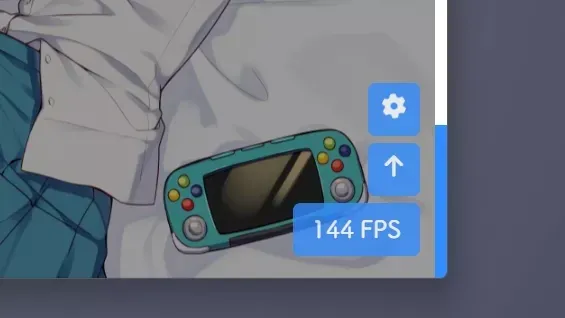
有一说一
TL;DR: 看到过一个博客左下角有 FPS 显示,觉得很炫酷也想做一个。网上没找到比较直观的教程,于是自己写了一个顺带发出来。原谅里面有些地方我自己可能都没弄懂就发上来了,毕竟这是我第一次写教程。如果后续还有问题我再来修改吧。
效果预览
点击查看预览效果

编写步骤
- 确认 jQuery,若您知道自己的网站是否加载了
jQuery,请直接去下一步。
如何确认是否加载了 jQuery
- 首先,打开您的网站,按 F12 或者 Ctrl + Shift + I
- 在弹出的窗口选择
Console(也可能译作控制台) - 在控制台输入
jQuery(注意区分大小写)并回车,一般会出现以下两种情况:
已加载
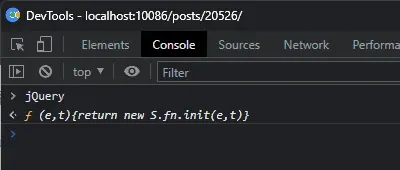
得到的输出不是红色的报错,您多半是 已经加载了 jQuery。
未加载
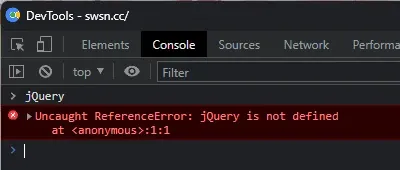
得到的输出是红色的报错,您多半是 还没有加载 jQuery。
- 创建文件
[Blogroot]\themes\butterfly\source\js\fps.js,内容如下:
$("body").before('<div class="fps wow animate__slideInRight"></div>');
var showFPS = (function () {
  appendFps = function (fps) {
    $(".fps").html(fps + " FPS");
  };
  var requestAnimationFrame =
    window.requestAnimationFrame ||
    window.webkitRequestAnimationFrame ||
    window.mozRequestAnimationFrame ||
    window.oRequestAnimationFrame ||
    window.msRequestAnimationFrame ||
    function (callback) {
      window.setTimeout(callback, 1000 / 60);
    };
  var e, pe, pid, fps, last, offset, step, appendFps;
  appendFps(0);
  fps = 0;
  last = Date.now();
  step = function () {
    offset = Date.now() - last;
    fps += 1;
    if (offset >= 1000) {
      last += offset;
      appendFps(fps);
      fps = 0;
    }
    requestAnimationFrame(step);
  };
  step();
})();- 创建文件
[Blogroot]\themes\butterfly\source\css\fps.css,内容如下:
.fps {
    border-radius: 5px;
    padding-top: 10px;
    background-color: var(--btn-bg);
    color: var(--btn-color);
    text-align: center;
    font-size: 16px;
    font-family: ZZAW;
    opacity: 0.8;
    overflow: hidden;
    z-index: 9999;
    position: fixed;
    text-align: center;
    width: 85px;
    height: 35px;
    right: 10px;
    bottom: 15px;
    --animate-duration: 520ms;
}- 在
[Blogroot]\themes\butterfly\_config.yml的inject项配置项引入:
已加载 jQuery
inject:
  head:
    - <link rel="stylesheet" type="text/css" href="/css/fps.css">
  bottom:
    - <script defer src="/js/fps.js"></script>
未加载 jQuery
inject:
  head:
    - <script language="JavaScript" type="text/javascript" src="https://npm.elemecdn.com/jquery@latest/dist/jquery.min.js"></script>
    - <link rel="stylesheet" type="text/css" href="/css/fps.css">
  bottom:
- <script defer src="/js/fps.js"></script>- 为了防止主题原本的侧边按钮过低与帧数显示浮窗重叠,您可能需要修改
[Blogroot]\themes\butterfly\_config.yml的rightside-bottom值:
rightside-bottom: 50px